
Secure Password Management Across Devices
The LastPass password manager is designed to simplify digital security by allowing users to store, organize, and autofill login credentials across multiple platforms and browsers. It addresses the common challenge of managing numerous passwords across online accounts, reducing the risk of weak or reused passwords. The software is ideal for individuals seeking a reliable, free solution to protect personal and professional data. It supports a wide range of operating systems, including Windows, Mac, Linux, iOS, and Android, enabling seamless access from desktops, laptops, tablets, and smartphones. Real-world usage includes securing online banking, e-commerce accounts, social media profiles, and work-related portals. By centralizing password storage behind a single master password, LastPass reduces cognitive load and enhances account security. The developer did not provide additional system requirements or performance benchmarks.
Key Features & Capabilities
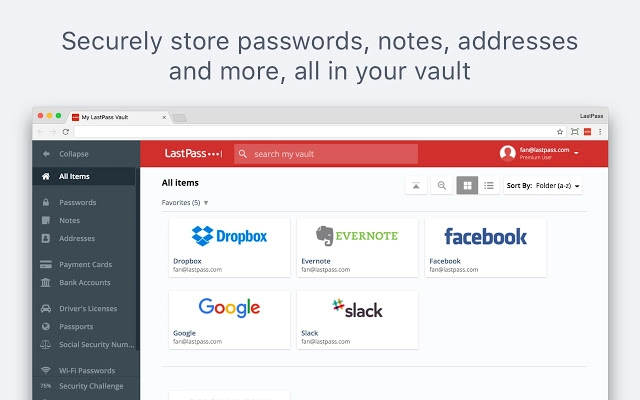
- Centralized Vault Storage: All usernames, passwords, credit card details, and documents can be saved in a single, encrypted vault. This allows users to manage sensitive data in one secure location, accessible from any device.
- Multi-Device Sync: Any changes made on one device—such as adding a new password—are instantly reflected across all other devices. This ensures consistent access and eliminates the need to manually update credentials.
- AutoFill & AutoLogin: The browser extension automatically fills login fields and logs users into websites, significantly reducing time spent on repetitive tasks and minimizing errors.
- Secure Password Generation: LastPass generates strong, random passwords during account sign-ups, helping users avoid weak or predictable combinations that are vulnerable to attacks.
- Security Checkup Tool: This feature scans stored passwords to identify weak, reused, or compromised credentials, prompting users to update them for better protection.
- Master Password Protection: Only the user knows their master password, which is never stored or transmitted to LastPass servers. This ensures that even if the cloud data is accessed, it remains inaccessible without the master key.
- Secure Sharing: Users can securely share passwords with trusted contacts, such as family members or team members, without exposing the actual password.
User Interface, Workflow & Performance
The LastPass interface is designed for simplicity and efficiency, with a clean layout that prioritizes accessibility. Users can navigate the vault through a searchable list, organize entries into folders, and quickly retrieve saved data. The browser extension integrates seamlessly into major web browsers, appearing as a small icon that triggers autofill when visiting login pages. The workflow is streamlined: save a new credential, and it becomes available across all devices. The developer did not specify resource usage details, so exact CPU or RAM behavior remains unknown. Performance observations are based on general software behavior patterns. Stability appears consistent across platforms, with no reported issues in the provided information. The application maintains responsiveness during typical use, such as logging into multiple accounts or accessing stored documents. Users can expect smooth operation in standard desktop and mobile environments.Compatibility & System Requirements
LastPass is compatible with Windows, Mac, Linux, iOS, and Android operating systems. The software supports installation on desktops, laptops, tablets, and smartphones. The current version is 6.1.1, with a file size of 35.7 MB. The developer did not specify exact system requirements, such as minimum RAM, processor speed, or disk space. Compatibility information was partially provided, and users are advised to ensure their devices meet general software installation standards. The application is available as a browser extension and mobile app, ensuring broad accessibility across different platforms and usage scenarios.Pros and Cons
- Free to use with full core functionality
- Supports multiple operating systems and browsers
- Automatic syncing across all devices
- Strong password generation and security scanning tools
- Encrypted vault with master password protection
- Secure sharing capabilities for trusted contacts
- Simple, intuitive interface
- Dependence on a single master password for access
- No offline mode mentioned in provided details
- Resource usage details not publicly disclosed
- Cloud-based storage may raise privacy concerns for some users
- Advanced features require a paid subscription
Is LastPass compatible with my operating system?
LastPass supports Windows, Mac, Linux, iOS, and Android. If your device runs one of these systems, you can install and use the software.
Is LastPass safe to use?
LastPass uses strong encryption to protect data, and your master password is never stored or shared with the company. Only you can access your vault.
How often does LastPass update?
LastPass releases updates regularly to improve security, fix bugs, and add new features. The current version is 6.1.1, with the latest update released on May 20, 2024.
What type of license does LastPass offer?
LastPass is available as a free software tool with basic features. Advanced features like multi-factor authentication and priority support are available in paid plans.
Can I use LastPass offline?
The developer did not provide information about offline functionality. The software primarily relies on cloud sync for access across devices.







